CRO Analyzer: The Ultimate Guide to Boosting Website Conversions in 2026
Introduction
Did you know that the average website converts only 2.35% of its visitors into customers? That means for every 100 people landing on your site, roughly 97 leave without taking any action. If you are spending money on ads, SEO, or content to drive traffic, that number should keep you up at night.
A CRO analyzer is the tool that changes that equation. It tells you exactly why visitors are not converting, where they are dropping off, and what you can fix to turn more browsers into buyers. The global CRO software market was valued at $10.4 billion in 2024 and is projected to reach $23.64 billion by 2032, according to Verified Market Research. That explosive growth reflects one simple truth: businesses that analyze and optimize conversions grow faster than those that do not.
In this guide you will learn what a CRO analyzer actually does, which tools are the best in 2025, how to build a free CRO tools stack from scratch, how to run a complete CRO audit step by step, and how to pick the right software for your budget and business size.
What Is a CRO Analyzer and Why Does It Matter
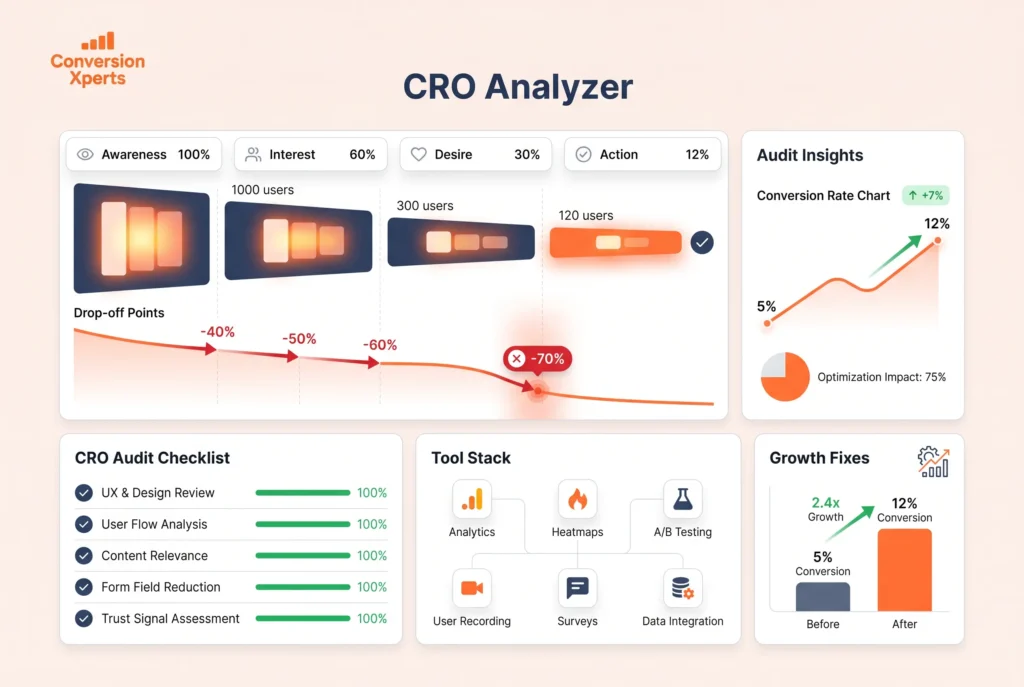
A CRO analyzer is a software tool or suite of tools designed to identify why website visitors are not completing desired actions and provide actionable data to fix those issues. Desired actions can include making a purchase, signing up for a newsletter, requesting a demo, calling a business, or downloading a resource.
Conversion rate optimization itself is the systematic process of increasing the percentage of visitors who take those actions. A CRO analyzer is the diagnostic layer that powers that process.
The Real Cost of Not Analyzing Conversions
Most businesses focus entirely on getting more traffic. They invest in SEO, paid ads, and social media while ignoring the fact that their website is leaking revenue at every step of the funnel.
According to Marketing LTB, 58% of companies still make website changes based on opinions rather than data. That is a staggering number. It means more than half of businesses are guessing what their users need instead of measuring it.
The businesses that use CRO analyzers get measurably better results:
Companies running CRO experiments every month see an average 1.8x increase in annual revenue. Businesses dedicating more than 5% of their budget to CRO see 4x higher conversion lifts. Structured CRO programs deliver an average ROI of 223%.
Those are not projections. Those are averages across companies that committed to data-driven optimization.
What a CRO Analyzer Actually Measures
A modern CRO analyzer measures and visualizes several layers of user behavior. Understanding each layer helps you pick the right tool for the job.
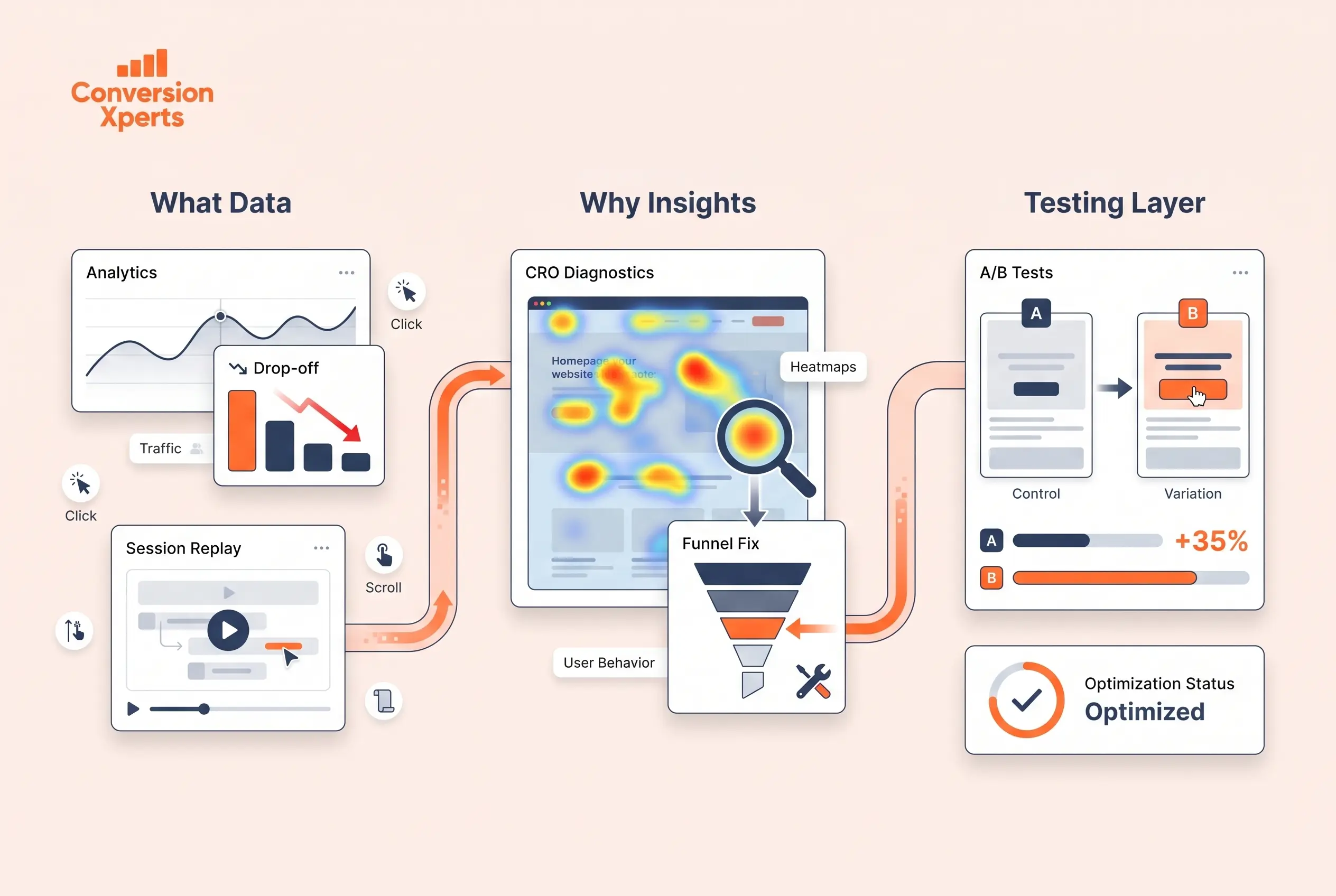
Quantitative data tells you what is happening. It includes traffic volumes, bounce rates, exit rates, click-through rates, funnel drop-off percentages, and overall conversion rates. Tools like Google Analytics 4 and Mixpanel specialize in this layer.
Qualitative data tells you why it is happening. It includes heatmaps showing where users click and scroll, session recordings showing individual user journeys, and on-site surveys asking users directly what stopped them from converting. Tools like Hotjar and Microsoft Clarity specialize here.
Experimental data tells you what actually fixes the problem. It includes A/B tests, multivariate tests, and redirect tests that compare two versions of a page to determine which performs better. Tools like VWO and Optimizely specialize in this layer.
The best CRO analyzers combine all three data types into a single workflow. When you see quantitative data pointing to a problem, you use qualitative tools to diagnose it, then run experiments to validate the fix.
The Best CRO Analyzer Tools for 2025 (Paid and Free)
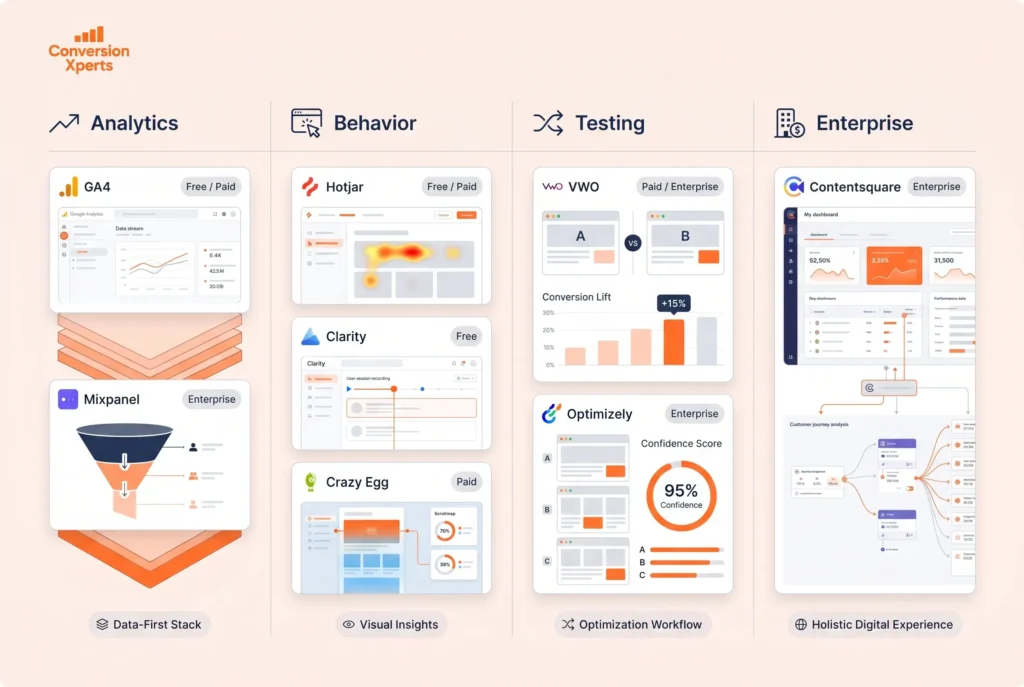
The CRO tools landscape in 2025 is rich, competitive, and more accessible than ever. Below are the top tools organized by category, with honest assessments of what each does well.
Google Analytics 4 (GA4): The Conversion Data Foundation
Google Analytics 4 is the non-negotiable starting point for any CRO analyzer stack. It is free, powerful, and deeply integrated with every other Google product.
GA4 shifted from session-based measurement to event-based measurement, which makes it significantly more useful for conversion analysis. You can now track any user interaction as an event, build custom funnels, set up conversion goals, and analyze the exact path users take before converting or abandoning.
Key GA4 features for CRO analysis include the Funnel Exploration report, which shows you where users are dropping off at each stage of your conversion funnel. The Path Exploration report shows you the actual routes users take through your site. Audiences let you segment users by behavior, source, device, and dozens of other dimensions for deeper analysis.
The limitation of GA4 is that it tells you what users are doing but not why. It is quantitative data without the visual or qualitative layer. That is why it pairs perfectly with the tools below.
Best for: Every business at every stage. No exceptions. Price: Free.
Hotjar: The Most Popular All-in-One CRO Analyzer
Hotjar is the most widely recognized name in behavioral analytics and conversion research. It combines heatmaps, session recordings, on-site surveys, and feedback polls into a single platform.
The heatmaps show you exactly where users click, how far they scroll, and where their mouse moves on any given page. This is extremely valuable for identifying dead zones (areas users ignore), rage clicks (elements users click repeatedly expecting a response that does not come), and navigation patterns.
Session recordings are short videos of real user sessions on your site. Watching a few dozen sessions from users who abandoned your checkout page can reveal friction points that no amount of quantitative data would surface. A confusing form field, an unclear button label, a page element that breaks on mobile: all of these show up immediately in session recordings.
Hotjar’s survey and feedback tools let you ask users directly why they did not convert. A simple one-question exit survey asking “What stopped you from completing your purchase today?” can produce insights worth thousands of dollars in revenue recovery.
Best for: Mid-market teams that need behavior analytics and feedback in one tool. Price: Free plan available. Paid plans start at $32 per month.
Microsoft Clarity: The Best Free CRO Analyzer for Heatmaps
Microsoft Clarity is completely free and has no session recording limits or heatmap caps. That alone makes it the most generous free CRO tool on the market today.
Clarity provides click heatmaps, scroll maps, and session recordings with no artificial limits on the number of sessions captured. It also has a standout feature called “Dead Clicks” and “Rage Clicks” detection, which automatically surfaces sessions where users are experiencing frustration.
The dashboard is clean and surprisingly powerful for a free tool. Clarity integrates directly with GA4, allowing you to see behavior analytics data alongside conversion data in a unified view.
For businesses under 100,000 monthly visitors, Clarity can replace paid behavior analytics tools entirely. Even larger businesses use it as a complementary layer alongside Hotjar or FullStory.
Best for: Startups, small businesses, and any team that needs heatmaps and session recordings without a budget. Price: Free. Completely free.
VWO (Visual Website Optimizer): The Best A/B Testing CRO Analyzer
VWO is widely considered the best-balanced A/B testing platform for mid-market businesses. It combines A/B testing, multivariate testing, heatmaps, session recordings, and funnel analysis in one integrated platform.
The standout advantage of VWO over competitors is the integrated loop between insight and experiment. You can identify a friction point using VWO’s heatmaps, create an A/B test to address it using VWO’s visual editor, analyze results in VWO’s reporting dashboard, and roll out the winning variation without touching a line of code. That closed loop is extremely valuable for teams without dedicated developers.
VWO also offers SmartStats, a Bayesian statistics engine that gives you faster and more reliable test results compared to traditional frequentist A/B testing. This matters because most A/B tests run by businesses are underpowered and reach false conclusions. VWO’s statistics layer reduces that risk significantly.
Best for: Mid-market businesses running structured experimentation programs. Price: Plans start around $199 per month based on monthly tracked users.
Optimizely: Enterprise-Grade CRO Analyzer
Optimizely is the enterprise standard for large-scale experimentation programs. It offers advanced A/B testing, multivariate testing, feature flagging, and personalization capabilities that go far beyond what mid-market tools offer.
The platform is built for engineering teams that run hundreds of concurrent experiments across web, mobile, and server-side environments. Optimizely’s statistical engine is extremely sophisticated, and its targeting and segmentation capabilities are among the best available.
The trade-off is cost and complexity. Optimizely’s enterprise pricing starts in the range of $200,000 per year or more, which puts it out of reach for most small and mid-size businesses. It is the right tool for companies like eBay, IBM, or Atlassian that run thousands of experiments per year.
Best for: Enterprise companies with dedicated CRO and engineering teams. Price: Custom enterprise pricing.
Crazy Egg: Visual CRO Analysis with Built-In Testing
Crazy Egg was one of the original heatmap tools and remains a strong option for teams that want visual behavior analytics connected directly to A/B testing capabilities.
Crazy Egg’s “Snapshots” show heatmaps, scroll maps, and confetti maps (individual click dots color-coded by traffic source) on any page. Its “Recordings” feature captures individual user sessions. And its A/B testing editor allows you to make design changes and run tests without developer involvement.
Crazy Egg is particularly well-suited for small ecommerce businesses and content sites that want visual insight and quick testing in one affordable platform.
Best for: Small businesses and ecommerce stores needing visual insight and testing together. Price: Plans start at $29 per month.
Mixpanel: Advanced Funnel and Behavioral Analytics
Mixpanel is a product analytics platform that excels at tracking user journeys across complex digital products and funnels. It is particularly powerful for SaaS companies, mobile apps, and multi-step conversion funnels.
Where GA4 gives you page-level data, Mixpanel gives you user-level data. You can track every action a specific user segment takes from first visit through conversion and retention. Cohort analysis in Mixpanel lets you compare how different groups of users behave over time, which is invaluable for understanding what drives long-term conversion performance.
Mixpanel’s Flows report visualizes the actual paths users take through your product or site, making it easy to see where users deviate from your intended conversion path.
Best for: SaaS companies, mobile apps, and businesses with complex multi-step conversion funnels. Price: Free plan available for up to 20 million events per month. Paid plans start at $28 per month.
Contentsquare: Enterprise Behavior Analytics at Scale
Contentsquare is the most advanced enterprise behavior analytics platform available. It uses zone-based analytics rather than traditional click heatmaps, meaning it analyzes entire page sections rather than individual interactions and attributes revenue and conversion outcomes to specific content zones.
This revenue attribution capability is what separates Contentsquare from other behavior analytics tools. You can see not just where users click but how much revenue each element on your page is generating. That level of insight allows for extremely precise CRO prioritization.
Best for: Large ecommerce businesses, media companies, and enterprises needing revenue-attributed behavior analytics. Price: Custom enterprise pricing.
Free CRO Tools That Actually Deliver Results
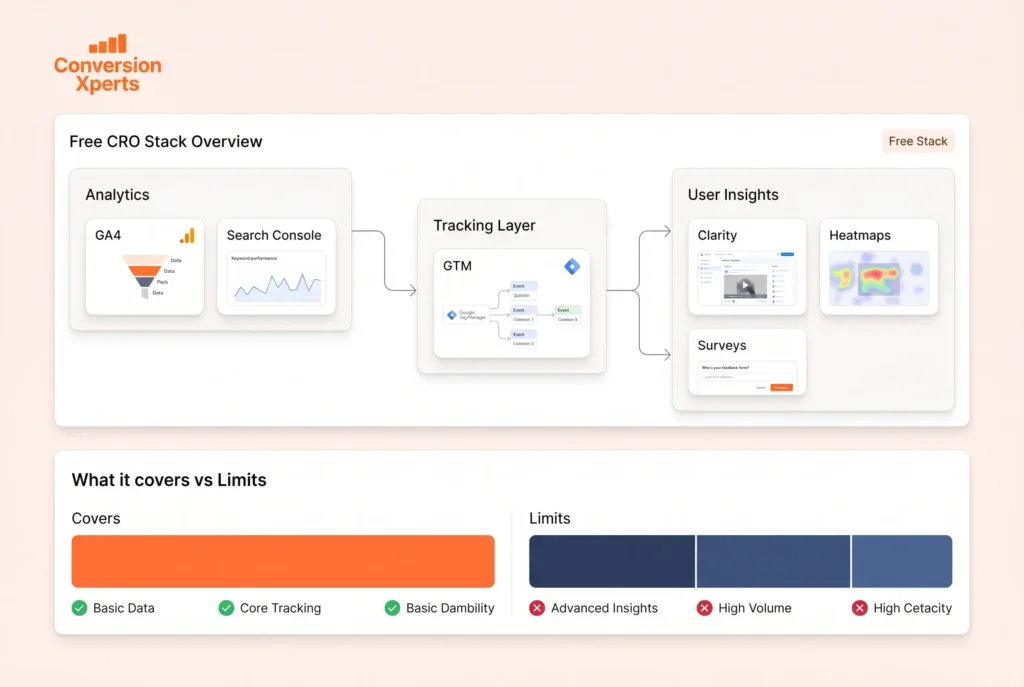
One of the most persistent myths in conversion optimization is that you need expensive tools to get meaningful results. That is not true. A well-configured free CRO tools stack can outperform a poorly used paid stack every time.
Building a Zero-Cost CRO Analyzer Stack
The strongest free CRO foundation available today combines Google Analytics 4, Microsoft Clarity, and Google Tag Manager.
GA4 gives you conversion tracking, funnel analysis, audience segmentation, and traffic attribution. Microsoft Clarity gives you unlimited heatmaps, session recordings, and automatic frustration signal detection. Google Tag Manager gives you the infrastructure to deploy tracking codes, set up custom events, and manage your entire analytics implementation without touching your site’s code.
This three-tool free stack covers quantitative analysis, qualitative behavior analysis, and event management. For most businesses under 50,000 monthly visitors, this is everything you need to identify and fix your most significant conversion problems.
Free Tools Worth Adding to Your Stack
Beyond the core three, several other free tools add meaningful CRO analysis capability:
Google Search Console reveals how users find your site through organic search, which pages have high impressions but low clicks (indicating poor title tags or meta descriptions), and which queries are driving your most valuable traffic. This data directly informs which pages deserve CRO attention first.
Hotjar Free Plan gives you 35 daily heatmap sessions and 35 daily session recordings. For a low-traffic site, this is sufficient to capture meaningful behavioral data on your most important pages.
Plerdy Free Plan combines heatmaps, session recordings, pop-ups, sales performance tracking, and a basic SEO checker in a single free tool. It is particularly useful for ecommerce businesses on a zero budget.
SurveyMonkey Free Plan and Typeform Free Plan let you create on-site and post-interaction surveys. Getting direct feedback from users who did not convert is one of the highest-value CRO activities available, and you can do it for free.
The Limits of Free CRO Tools
Free tools have real limitations that become significant as your traffic and testing needs grow.
Session recording limits mean you may not capture enough data to draw statistically meaningful conclusions on high-traffic pages. Most free plans cap recordings at a level that represents only a small fraction of your actual traffic.
Absence of A/B testing is the biggest gap in free CRO tools stacks. Without the ability to run controlled experiments, you are identifying problems but cannot systematically validate your solutions. When you are ready to invest, adding an A/B testing tool should be the first paid addition to your stack.
Data retention limits on free plans can prevent you from analyzing trends over time, which is important for understanding seasonal patterns and the long-term impact of changes.
How to Use a CRO Analyzer to Run a Full Website Audit
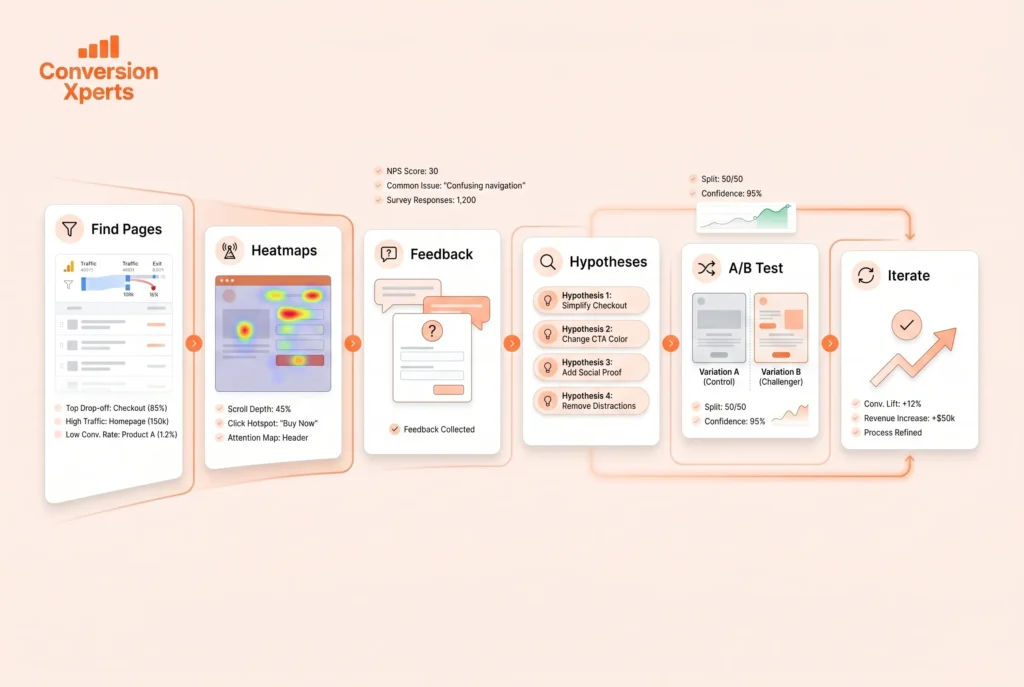
A CRO analyzer is only as valuable as the process you use to apply it. Running a structured CRO audit ensures you are fixing the right problems in the right order.
Step 1: Identify Your Most Important Conversion Pages
Start with GA4. Go to Pages and Screens, sort by sessions, and identify the pages that receive the most traffic but have the lowest conversion rates. These are your highest-opportunity pages.
Also check your Funnel Exploration report to identify the steps in your conversion funnel with the highest drop-off rates. A 60% drop-off between your product page and your cart page is more actionable than a 10% drop-off between your home page and a blog post.
Prioritize pages and funnel steps by multiplying traffic volume by drop-off rate. The result is a rough estimate of how many conversions you are losing at each step, which helps you focus on high-impact areas first.
Step 2: Analyze User Behavior with Heatmaps and Session Recordings
Once you know which pages to focus on, open Microsoft Clarity or Hotjar and review the heatmap and session recording data for those pages.
For heatmaps, look for these specific signals. Click concentration on non-clickable elements suggests users expect interactivity that does not exist. Low scroll depth on important pages suggests your above-the-fold content is not compelling enough to draw users down. Rage click clusters indicate elements that are confusing or broken.
For session recordings, watch 20 to 30 sessions from users who visited your target page and did not convert. Look for hesitations, scrolling back and forth, abandonment at specific form fields, and any moment where the user’s behavior suggests confusion or friction.
Take notes on patterns. A single user’s behavior may be idiosyncratic. Patterns across multiple sessions are conversion problems.
Step 3: Collect Qualitative Feedback
Deploy a simple exit-intent survey on your highest-drop-off pages. Ask one question: “What stopped you from completing this action today?” or “Is there anything we could do better on this page?”
Even a few dozen responses can reveal issues that no amount of quantitative or behavioral data surfaces. Common findings include unexpected shipping costs (for ecommerce), confusing pricing information (for SaaS), and trust concerns like lack of visible security indicators or reviews.
Step 4: Form Hypotheses and Prioritize
Based on your quantitative analysis, behavioral data, and qualitative feedback, create a list of conversion hypotheses. Each hypothesis should follow this structure: “If we change X because users are doing Y (we know this from Z data), we expect conversions to increase by approximately W%.”
Prioritize your hypotheses using the PIE framework: score each hypothesis on Potential impact (1 to 10), Implementation ease (1 to 10), and Evidence strength (1 to 10). Divide the total by 3 to get a PIE score. Work through your list from highest to lowest PIE score.
Step 5: Run Controlled A/B Tests
Never make conversion changes without testing them. Even changes that seem obviously better can hurt conversions in ways you would not predict.
Use VWO, Optimizely, or a comparable A/B testing platform to set up a controlled experiment. Show the original version to 50% of visitors and the new version to the other 50%. Run the test until you reach statistical significance (typically 95% confidence with at least 300 conversions per variation).
Act only on the results. If the test wins, roll out the change. If it loses or is inconclusive, go back to your hypothesis list and test the next highest-priority idea.
Step 6: Document and Iterate
Every test, win, loss, or inconclusive result teaches you something valuable about your users. Keep a testing log that records what you tested, why, what the results were, and what you learned. Over time, this log becomes a proprietary knowledge base about your specific customers that no competitor can replicate.
CRO Analyzer Tools Comparison: Features, Pricing, and Best Use Cases
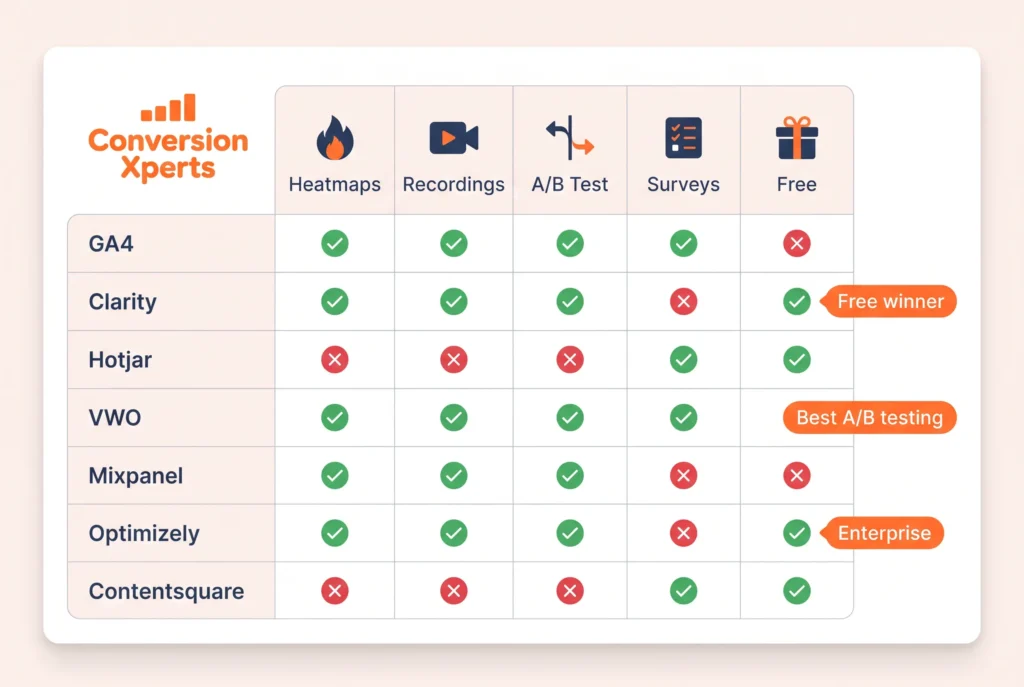
The table below summarizes the key attributes of the most important CRO analyzer tools available in 2025.
| Tool | Best For | Heatmaps | Session Recordings | A/B Testing | Surveys | Free Plan | Starting Price |
Google Analytics 4 | All businesses | No | No | No | No | Yes | Free |
Microsoft Clarity | All businesses | Yes | Yes | No | No | Yes | Free |
Hotjar | Mid-market teams | Yes | Yes | Basic | Yes | Yes | $32/mo |
Crazy Egg | Small to mid businesses | Yes | Yes | Yes | No | No | $29/mo |
VWO | Mid-market experimentation | Yes | Yes | Advanced | Yes | No | $199/mo |
Mixpanel | SaaS and apps | No | No | No | No | Yes | $28/mo |
Optimizely | Enterprise | No | No | Advanced | No | No | Custom |
Contentsquare | Enterprise ecommerce | Advanced | Yes | No | No | No | Custom |
Plerdy | SMB ecommerce | Yes | Yes | Basic | No | Yes | Free |
FullStory | Mid to enterprise | Yes | Yes | No | No | No | Custom |
Which CRO Analyzer Wins in Each Category
Best free CRO analyzer: Microsoft Clarity wins outright. Unlimited heatmaps and session recordings at zero cost, with automatic frustration signal detection included.
Best all-in-one CRO analyzer: Hotjar for mid-market teams that want behavior analytics, surveys, and feedback in a single, well-designed platform.
Best A/B testing CRO analyzer: VWO for the best combination of power, usability, and pricing for non-enterprise teams.
Best enterprise CRO analyzer: Contentsquare for revenue-attributed behavior analytics or Optimizely for large-scale experimentation programs.
Best CRO analyzer for ecommerce: Heatmap.com, which ties revenue directly to every element on every page, or Plerdy for budget-conscious ecommerce teams.
Advanced CRO Analysis Techniques Used by Top Marketers
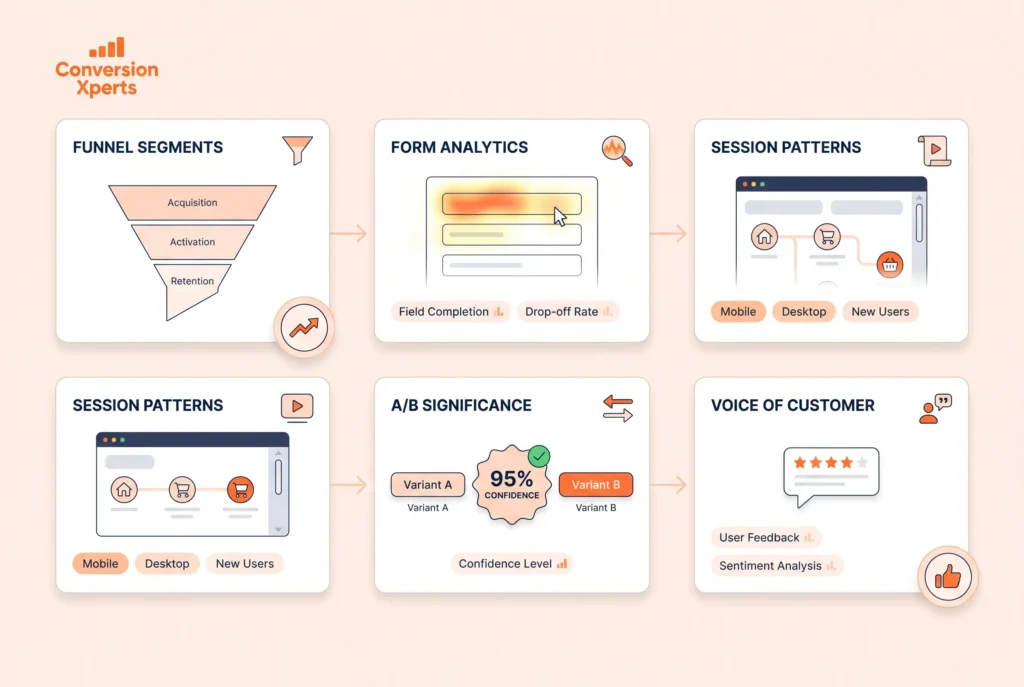
Understanding which tools to use is only half the equation. The techniques you apply with those tools determine the quality of your conversion insights.
Funnel Segmentation Analysis
Most CRO audits look at aggregate conversion data, which hides the real story. Top CRO practitioners segment their funnel data by traffic source, device type, user geography, new versus returning visitors, and campaign.
For example, your overall checkout conversion rate might be 3.5%. But when you segment by device, you might find that desktop converts at 5.2% while mobile converts at only 1.8%. That 3.4 percentage point gap on mobile represents a massive, specific opportunity that disappears in aggregate data.
Always segment before drawing conclusions from your CRO analyzer data. The most valuable insights almost always live inside a specific segment.
Form Analytics for Lead Generation Sites
If your conversions depend on form completions, dedicated form analytics tools reveal friction points that general heatmaps miss. Tools like Formisimo and Hotjar’s form analysis feature track field-level metrics: which fields users abandon the form on, which fields take the longest to complete, which fields trigger the most restarts, and which fields are left blank most often.
According to Marketing LTB, reducing form fields from 7 to 3 increases conversions by 20 to 35%. Form analytics shows you exactly which fields to remove.
Session Recording Pattern Analysis
Watching individual session recordings is useful. Finding patterns across thousands of sessions is transformative. Modern CRO analyzers like FullStory and Contentsquare use machine learning to automatically surface sessions that share common behavior patterns.
Instead of watching recordings one by one, you can filter for sessions where users rage-clicked on your checkout button, or where users scrolled to your pricing table three or more times, or where users visited your FAQ page before abandoning. These filtered segments reveal systematic friction that you can address with targeted changes.
Statistical Significance and Sample Size Planning
One of the most common and costly mistakes in CRO analysis is stopping tests too early. When an A/B test shows early positive results, the temptation to declare victory and move on is strong. But early results are almost always noisy.
Proper A/B testing requires pre-determining your sample size before running the test. Use a sample size calculator to determine how many visitors per variation you need to detect a meaningful improvement at 95% confidence. Running tests until you hit that sample size prevents false positives that lead to bad decisions.
Companies that follow proper statistical methodology in their CRO testing programs see dramatically more consistent improvements than those that make decisions on underpowered tests.
Voice of Customer Research as a CRO Analyzer Layer
Exit surveys, post-purchase surveys, and customer interviews are often undervalued as CRO analysis tools. They are the only way to understand the emotional and motivational factors driving conversion decisions.
A particularly powerful technique is asking customers who converted why they chose you over alternatives. Their answers reveal your most compelling value propositions. You can then test bringing those specific phrases and messages to the front of your conversion funnel to see if they lift performance for users who have not yet decided.
How to Build a CRO Analyzer Stack by Business Size
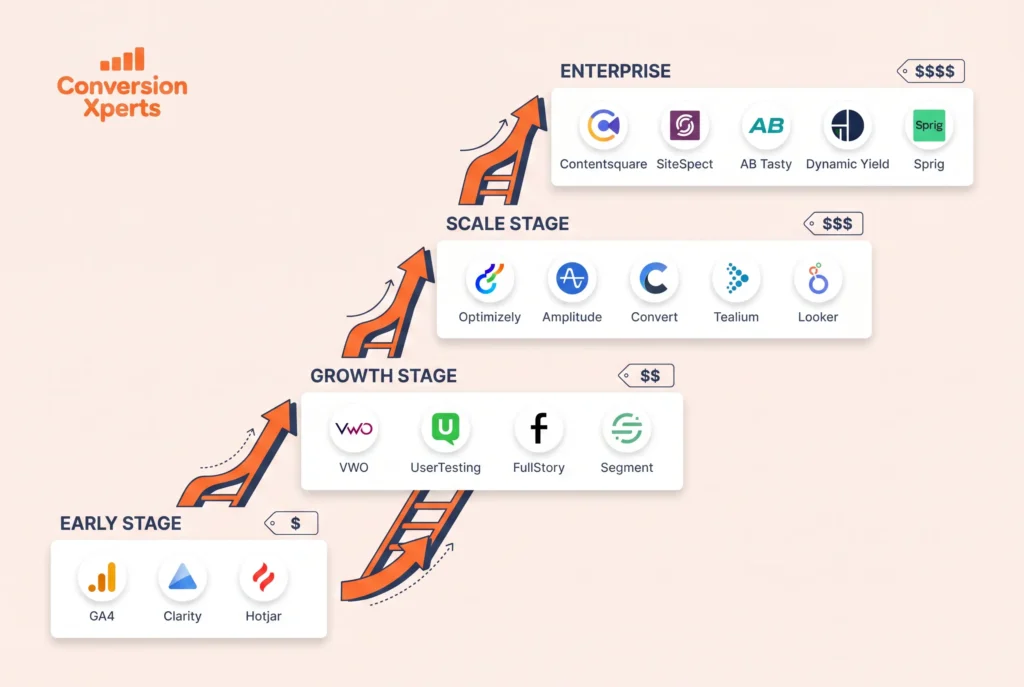
The right CRO tool stack depends on your traffic volume, budget, and team capacity. More tools without the capacity to act on the data they produce just creates noise.
Pre-Launch or Early Stage (Under 10,000 Monthly Visitors)
At this stage, you likely do not have enough traffic to run statistically significant A/B tests. Your CRO analysis goal is qualitative: understand your users deeply, identify obvious friction, and fix it before investing in driving more traffic.
Recommended stack: Google Analytics 4 (free) for conversion tracking and basic funnel analysis. Microsoft Clarity (free) for heatmaps and session recordings. Hotjar free plan for on-site surveys and user feedback. Total cost: zero.
Focus on watching session recordings, running simple user surveys, and making obvious improvements based on patterns you observe.
Growth Stage (10,000 to 100,000 Monthly Visitors)
At this stage, you have enough traffic to start running meaningful A/B tests on your highest-traffic pages. You are also likely investing meaningfully in paid traffic, which increases the ROI of conversion improvements.
Recommended stack: Google Analytics 4 (free) for analytics foundation. Microsoft Clarity (free) for behavior analytics and session recordings. VWO or a comparable A/B testing tool ($200 to $400 per month) for structured experimentation. Hotjar paid plan ($32 to $80 per month) for surveys and deeper behavior analysis on specific pages.
At this stage, every 1% improvement in conversion rate directly reduces your customer acquisition cost and improves return on ad spend. The investment in an A/B testing tool typically pays for itself many times over within the first month.
Scale Stage (100,000 to 1 Million Monthly Visitors)
At higher traffic volumes, you can run faster tests, test more complex hypotheses, and segment your optimization program across different audience types and product lines.
Recommended stack: Google Analytics 4 for analytics. FullStory or Hotjar Business for enterprise-grade session analytics and integrations. VWO or AB Tasty for comprehensive A/B and multivariate testing. Mixpanel for deep funnel and cohort analysis if you have a SaaS product or multi-step funnel. A voice of customer tool like Qualtrics or Medallia for systematic user feedback collection.
At this stage, having a dedicated CRO analyst or a specialized CRO agency managing your program becomes worth the investment. According to Marketing LTB, only 37% of organizations have a dedicated CRO specialist. That gap represents a competitive advantage for businesses willing to invest in specialized expertise.
Enterprise (Over 1 Million Monthly Visitors)
Enterprise CRO programs operate at a completely different scale. They run dozens of concurrent experiments, personalize experiences for individual user segments, and integrate CRO data with broader business intelligence systems.
Recommended stack: Contentsquare or Glassbox for revenue-attributed behavior analytics. Optimizely or Adobe Target for large-scale experimentation. Qualtrics for voice of customer and experience management. A dedicated customer data platform like Segment or mParticle to unify behavioral data across touchpoints.
At enterprise scale, the CRO tools budget itself becomes a small fraction of the revenue impact generated by the program.